MACS Matchmaker
Cleanup
Determine Kinetics fits a concentration series, measured either as a single cycle or as repeated cycles regenerated between concentrations. Its Cleanup step lists every supported default — blank subtraction, immobilization normalization and fitting-interval trims — as an editable action. Inspect the preview and keep only corrections justified by the data; cleanup cannot compensate for an unsuitable concentration series or insufficient association or dissociation time.
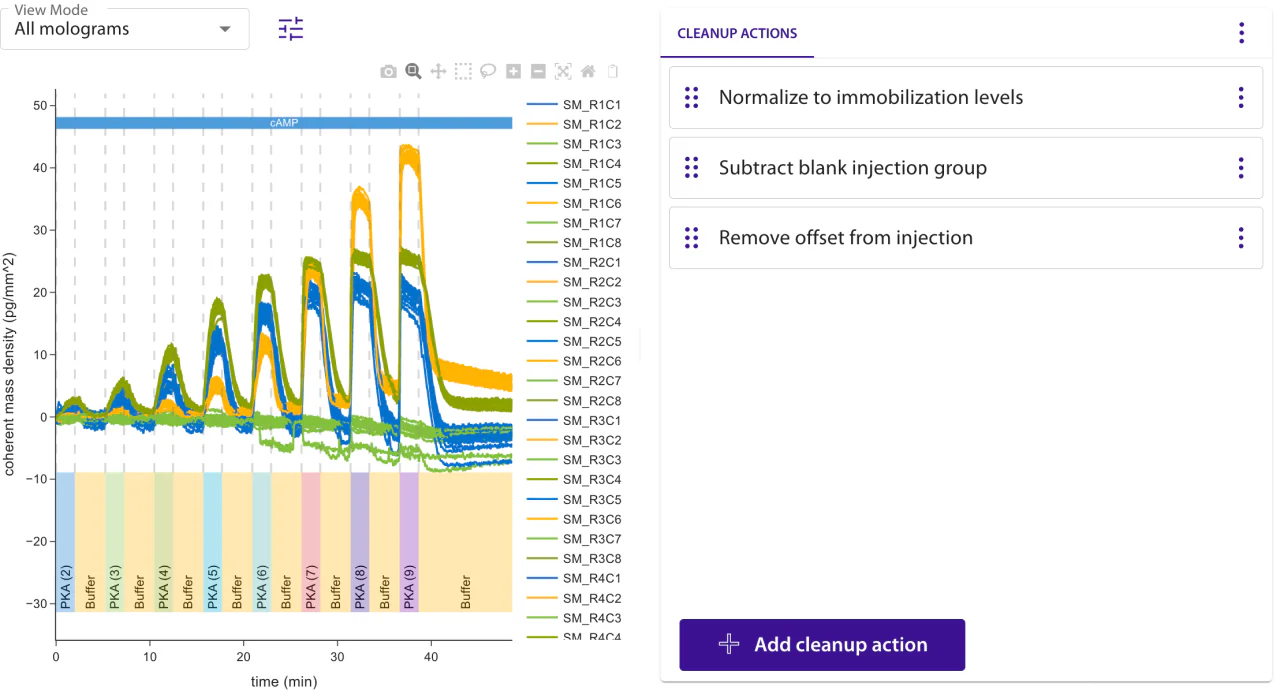
On a single-cycle titration, the cleanup also removes a saturated response tail without inventing an off-rate. Per mologram it scans backwards for at least two consecutive groups whose responses reach 95.0% of the normalized range and whose paired dissociation blocks decay by less than 5.00%, keeping a lone upper response as the high-concentration anchor; a measurable or unassessable wash ends that suffix. It removes the suffix shared by every fitted mologram, and the fit runs on exactly the selection that leaves behind. Where the remaining washes are themselves below the decay limit, the fit reports association rate only rather than a quantitative koff. When only some molograms qualify, the shared tail stays and those molograms are rejected automatically, without removing data the others use; an explicit acceptance overrides that. The 95.0%, 5.00% and two-group rules are fixed workflow policy rather than separate controls.
Editing cleanup actions preserves your manual accept/reject decisions, including decisions for molograms temporarily removed by cleanup. Previews and automatic rejections are recalculated. If an accepted mologram no longer has a successful fit, adjust the cleanup or fitting settings, or reject it before running the evaluation. Molograms absent from the cleaned data are omitted from the evaluation. A completed preview without a fit shows its preparation rejection reason, or “No fit available”. Changing the source data selection clears manual decisions; changing fitting settings clears decisions for the affected molograms.
Fitting settings by selection
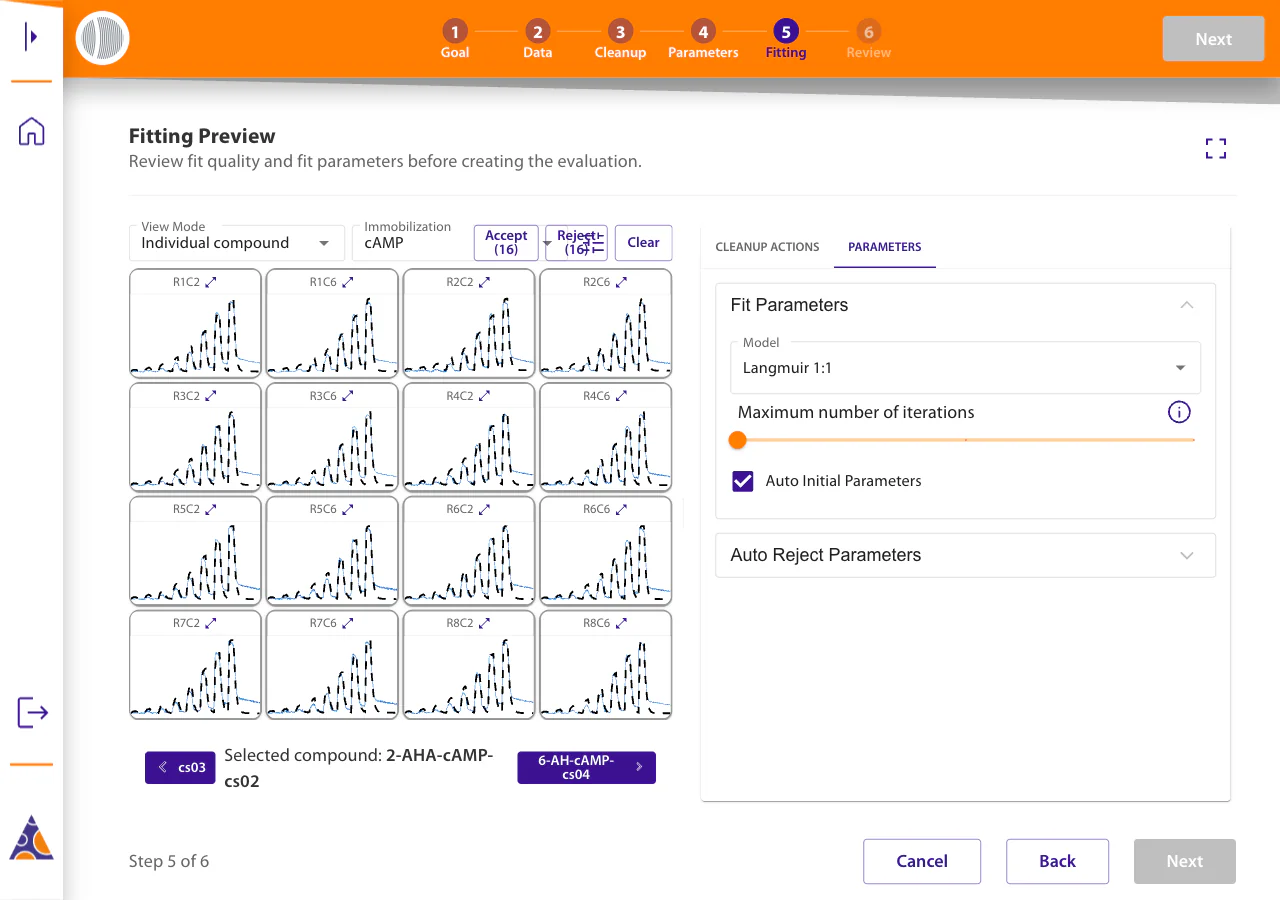
Maximum number of iterations offers Low (100), Medium (200), High (1,000), and Very high (5,000). New evaluations default to Medium (200 iterations). Higher limits allow more fitting work but can increase computation time. Increasing only this limit keeps completed successful previews and their accept/reject decisions, and retries unsuccessful fits. Changing other fit settings or lowering the limit refreshes the affected previews. The final evaluation fits the data using the selected settings.
Fit Parameters follows the selected view. Global settings are inherited by compounds without their own settings. Molograms inherit their compound settings unless individually customized. Each customization stores a complete configuration, so later changes to a parent do not change it. The panel title identifies the scope. Fitting opens in All molograms mode. Switching between view modes remembers your last compound or individual mologram and keeps its fitting settings. The up-arrow button beside View Mode moves from an individual mologram to its compound, and from a compound to All molograms. Custom selections and molograms without a compound go directly to All molograms.
In the all-molograms view, fitting controls lock when compounds or individual molograms use settings that differ from the global settings. The alert lists affected compounds by name and individual molograms by identifier. Click a compound or mologram name in the alert to select it and switch to its individual view. A listed compound covers its members, so those molograms are not listed again individually. Reset clears compound and individual customizations for the current input and restores global inheritance.
If individual molograms differ from their compound settings, the compound controls are locked. The alert names those molograms, and Reset removes individual customizations while preserving the compound settings. The disabled controls show the compound settings that Reset will restore.
An editable compound panel has a reset icon when customizations exist. Reset compound to global settings removes both compound and individual customizations. An individual mologram's reset icon restores its compound settings, or global settings if no compound is assigned.
Custom selection mode is for inspection; choose compound or individual mode to edit fitting settings. Switching views changes no settings. Automatic rejection settings apply to the whole evaluation and remain separate from the fitting controls.
A change to fitting settings requires reviewing the affected fits again. Saved evaluations retain each mologram's settings for re-evaluation. When molograms use different models, report summaries separate them by compound and model instead of combining their fitted parameters.
Reading the results
Deciding the last undecided mologram in the current view advances to the next view with undecided fits. Changing a decision in a fully decided view keeps you there, including when overriding an automatic rejection.
Every fit you accepted while reviewing stays in the saved results and the standard fit artifacts. The result view adds a tagged Rejected fits artifact naming why each mologram is absent — the fitter failure, the fit-quality threshold, or your own rejection — which Filter by tags shows or hides. A slow-dissociation result stays successful and carries a warning recommending a longer dissociation phase.
Automatic rejection compares one fit-quality metric against a threshold. The default metric is reduced chi-squared, the squared residual per degree of freedom in the squared units of the fitted response, with a default threshold of 0.05. Relative residual RMS, the root of that value divided by the response range, is the alternative and is independent of response scale. Every evaluation records the metric and threshold it ran with.
Initialization sits in the collapsed Advanced Parameters section; signal drift is removed earlier, as the Subtract fit cleanup action, not here. Manual initial-parameter fields identify kon in M−1 s−1, koff in s−1, normalized Rmax as dimensionless, and the normalized mass-transport constant kt in M−1 s−1.
For the physics of each model, see the Binding Models table on Interpreting Results, or use the info button at the right of Model Summary to open the simulator for the selected model. The simulator opens on the shape the cleanup produced — MCK for a cycle series, SCK for a titration — and its Kinetic mode toggle switches between the two.
Single-cycle and multi-cycle data
Determine Kinetics reads which of the two it has from the data rather than asking. Both are designed one injection group per concentration, so the grouping alone does not say: what separates them is the regeneration. A single-cycle titration raises the concentration on a surface that keeps what it bound, while a multi-cycle series regenerates after every association. A series is recognised when its groups share the same form and each holds one association followed by a regeneration; groups of another form — a conditioning group, a closing rinse — are left out.
The Cleanup step opens on the first phase whose injections carry either pattern, whatever type the phase was given, so a titration recorded under a phase named Custom is found like any other. Pick a different phase in the data-selection dialog and use Apply default cleanup actions to work the cleanup out again for it. A series is split into its cycles by the Group injections action, which appears in the Cleanup step like any other action and can be edited or removed.
One immobilization per evaluation
Determine Kinetics fits data holding a single immobilization: each immobilization gives the molograms different ligands, so two leave no one ligand per mologram for a fit to describe. Data recording none stays fittable, and a regenerated multi-cycle series is exempt from the count: it immobilizes per cycle, so counting across the series says nothing. A series still has to agree on which ligand each mologram carries, since one ligand is reported per mologram for the whole series. A cycle that re-immobilizes a mologram with a different ligand is refused, naming the mologram and both ligands.
Immobilizations belong to the trace, not to the molograms picked out of it, so a narrower mologram selection still carries them all. Keep only the injections covering one immobilization, or delete the others in the Edit immobilizations cleanup action. Traces are drawn and fitted over the whole measurement either way.
The Fitting step applies the same rule and names the reason in place of the fits, leaving the view, immobilization and fit-parameter controls inactive. The data selection and the cleanup actions stay editable, since those are what clears the block.
What every association has to record
A fit is defined on one named analyte at a known concentration, and both are read off the injection rather than entered in the evaluation. Every association therefore has to name its analyte and record a concentration — zero for a deliberate blank. Correct either in the Edit injections cleanup action.
Each cycle of a series also needs a dissociation after its association, which is the decay koff is read from. A dissociation lying before the association belongs to the cycle before it, and the fit does not see it; group the injections so each cycle carries its own.
Choosing what the plot shows
During cleanup, Individual compound groups molograms by their immobilization. The Immobilization selector chooses the assignment in view. During fitting, this mode groups molograms by compound name and includes only molograms available for fitting after selection and cleanup. Compounds without available molograms are omitted. A view mode picked by hand survives a change of the data selection.
Slow dissociation warnings
Each sensor fit is given one of three classifications:
- Complete kinetics — both kon and koff are quantifiable. The result includes kon, koff, and KD.
- Association rate only — koff is below the dissociation phase's detection limit. The fit remains successful: its fitted curves and kon remain available, with the fitted uncertainty interval when it can be calculated. The result reports koff as
< detection limitand KD as unavailable. - Unusable — fitting did not produce a successful result for the mologram. It is excluded from saved kinetic results and listed in Rejected fits with the failure reason.
The koff detection limit uses a fixed 5% criterion. The longest fitted dissociation must support at least a 5% signal decrease for koff to be quantifiable:
k_off detection limit = −ln(0.95) / dissociation durationA low koff is warning-only and rejects nothing on its own. The result page keeps the standard fit artifacts and adds a koff warning with the observed decay and the recommended longer dissociation phase.